
External Audio Editing
To edit the audio file of a particular song within SWDB (to add reverb, delete an interior section of the audio, add harmonies or other instruments, etc.), we recommend the following procedure:
- Download and install Audacity, a terrific free audio editor (Audacityteam.org). It works in Mac and PC.
- Within Audactiy, go to File/Open, and browse to the desired song audio file you wish to edit.
- To find the song, open SongwritersdB and use the Browse Location option within the song tile:
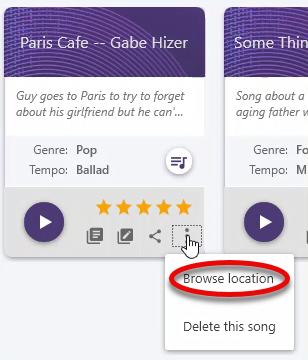
- The usual location of the songs is C:/users/[username]/Music/SongwritersdB Songs.
- In Audacity, open that song file.
- Edit the file within Audacity. You can remove sections of the song, add effects (reverb, delay, etc.), even add additional audio tracks.
- When you are satisfied with your edits, export as an .mp3 back to the location of the song, overwriting the old file; be sure to use the exact same name!
- Now when you play back that song within SongwritersdB, you will hear your new, edited version, complete with reverb, harmonies, etc.
Of course, you can also modify the above by using any other audio editor or DAW, following the steps above.