
Deleting One Song at a Time
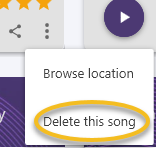
To delete a song, go to the Songs page, be sure you are in Tiles View mode (not Lyrics View), find the song you wish to delete, click the icon with three vertical dots…

and then click “Delete this song.”
CAUTION: Note that any imported songs will still exist in whatever folder they were copied from (see prior section), but any new songs you recorded within SongwritersdB will be erased from both the local (C:\Users\[username]\Music\SongwritersdB Songs) AND cloud drive (SongwritersdB/Songs) folders once you click the delete button. However, if you have made a Backup and no new Backup has been made (either manually or via the auto-backup feature) since you deleted the songs, going to Settings/Data Backup & Restore/Restore Backup will restore your Songs folder to the way it was before you made the deletions. So if you inadvertently delete a song, you can still retrieve it by quickly doing a Restore Backup. This is a good reason to make frequent backups, especially after adding a number of new songs to SongwritersdB.
Thus, if you wish to retain a song you recorded within SongwritersdB after removing it from the app, be sure to copy the audio file to another location before you click “Delete this song.”
Deleting Multiple Songs
To delete multiple songs:
- Enter Selection Mode by clicking “Songs” in the left menu, then clicking the first icon:
 at the top of the page..
 - You will then see all your songs with greyed-out checkmarks, like this:
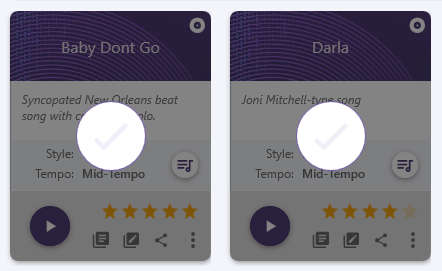
- For each song you wish to delete, click the checkmark, which will turn solid.
- When you have selected all the songs you wish to delete, click “Delete Selected” in the top right menu:
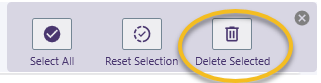
Deleting All or Almost All Songs: Enter Selection Mode, but instead of clicking songs one-by-one, click “Select All” in the menu on the right. Click Delete Selected to delete ALL your songs, or first click any of the selected songs you wish to keep and THEN click Delete Selected.
Use of Search:
- Narrow the group of songs to be deleted by first doing a Search or Advanced Search to display only the songs that meet the search criteria.
- Enter Selection Mode.
- Click “Select All” and “Delete Selected”. For example, if you decide to delete all your one-star songs, this is an easy way to do that.