
Where are my songs stored?
All songs (whether recorded within the app or imported from an external folder) are stored both locally and in the cloud.
Local Locations
Windows: The 6 default songs and any new songs you record or import can be found in the “SongwritersdB Songs” folder within your “Music” folder, which is located here:: C:/Users/[YourUserName]/Music
Mac: SongwritersdB/Songs
Cloud Locations
Google Drive: https://drive.google.com/drive/my-drive/SongwritersdB/songs
Backup files: In addition to the above locations, Pro/Pro+ version customers with an active license will be able to make a backup to an online folder, as follows:
- Click “Cloud Drive” on the Home page.
- Click the Data Backup/Restore tab.
- Click “Create backup manually” and then enter a file name (e.g., Backup 1).
- A backup folder will be created with the specified name to hold a zipped backup of your songs (audio) and all data (titles, lyrics, comments, tags, genres, Albums, etc.) here:
- Google drive: MyDrive/SongwritersdB/data
- DropBox: Dropbox/SongwritersdB/data
- Google drive: MyDrive/SongwritersdB/data
Song Locations
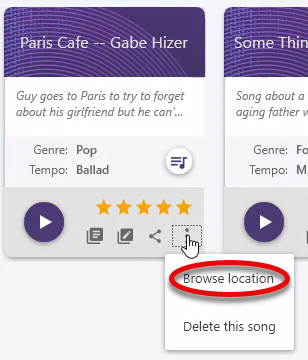
To locate the audio file for any song within the Songs page (in Projects View), click the icon with three vertical dots on the song project in question  , and then click “Browse location.”
.mp3 vs .wav
While SongwritersdB will work with either .mp3, .m4a, or .wav files, note that .mp3 files occupy between one-tenth (1/10) and one-fifth (1/5) of the hard-disc space within your computer (depending on the selected bit rate). For example, a three-minute song in .wav format will typically require around 32 MB of hard drive space, while an .mp3 file of the same song at 256 kbps will require only 6 MB of space.
For the purposes of SongwritersdB, where the absolute best CD-quality audio is not needed, we recommend always using a 256 kbps/.mp3 file format whenever possible. This will save a lot of space on your hard drive, as the number of your songs increases, yet still deliver high-quality audio.
Mac tip: Although .m4a files have slightly higher fidelity than .mp3 files, .m4a files are not as universally accepted as are .mp3 files. Thus, if you share an .m4a file from your Mac to a person with a PC or Android phone, their media player may not be able to play it back (without first converting it using conversion software). So it may be better in the long run to stick to .mp3 files for all your songs.
Program Locations
Windows: The default location of the program and related files is C:/Program Files (x86)/SongwritersdB.
Mac: The default location of the program and related files is Applications/SongwritersdB.
Updates: When a new update is issued, you will see the notice when you next log into the app on your desktop. After the download is complete, it will automatically install the update.
Re-installation: Should you ever need to re-install a new update, the files will be located in the default Downloads folder (in Windows, typically C:/Users/[yourname]/Downloads).